Case study

From one spreadsheet to a job tracker the whole team can use
Pix and Plans draws floor plans. Doug, who runs it, wanted one place where his six drawers log their jobs and days off and see their own figures, without anyone adding them up by hand.
- Client
- Floor plan drawing team
- What I built
- A team job tracker with private logins
- Turnaround
- Asked for on 4 November 2026, built and in his Google account the next day
- Running cost
- No extra monthly cost. It runs on the free allowance in his existing Google account
What they needed
One drawer's jobs were in a spreadsheet, and for everyone else it was a feel
Doug had built a spreadsheet to track one drawer's jobs: sketches, scans, redraws and more. Spreading it across the team by hand would have been slow, and small things skewed the numbers. A month in progress looked poor because it divided by every working day in the month, not the days that had passed, and nothing warned you if the same job went in twice.
The first plan he had sketched out needed its own server, a computer somewhere that someone has to set up and keep running. He wanted something he owned outright that would just keep working.
Literally no way of easily tracking, 6 employees with nothing but a "feel" for the actual work output.Doug Rankine, Pix and Plans
What I built
A web page on top of one Google Sheet that Doug owns
The team open a link on their computers and log in with their own username and password. Nothing to install, no server to look after, no monthly bill.
Log a job in one short form
The date, the address, the square footage and the type of work. Each person only sees the types of work they actually do.
Log days off, half days included
Public holidays are already taken out, so the working days are right without anyone counting them.
See your own month and year
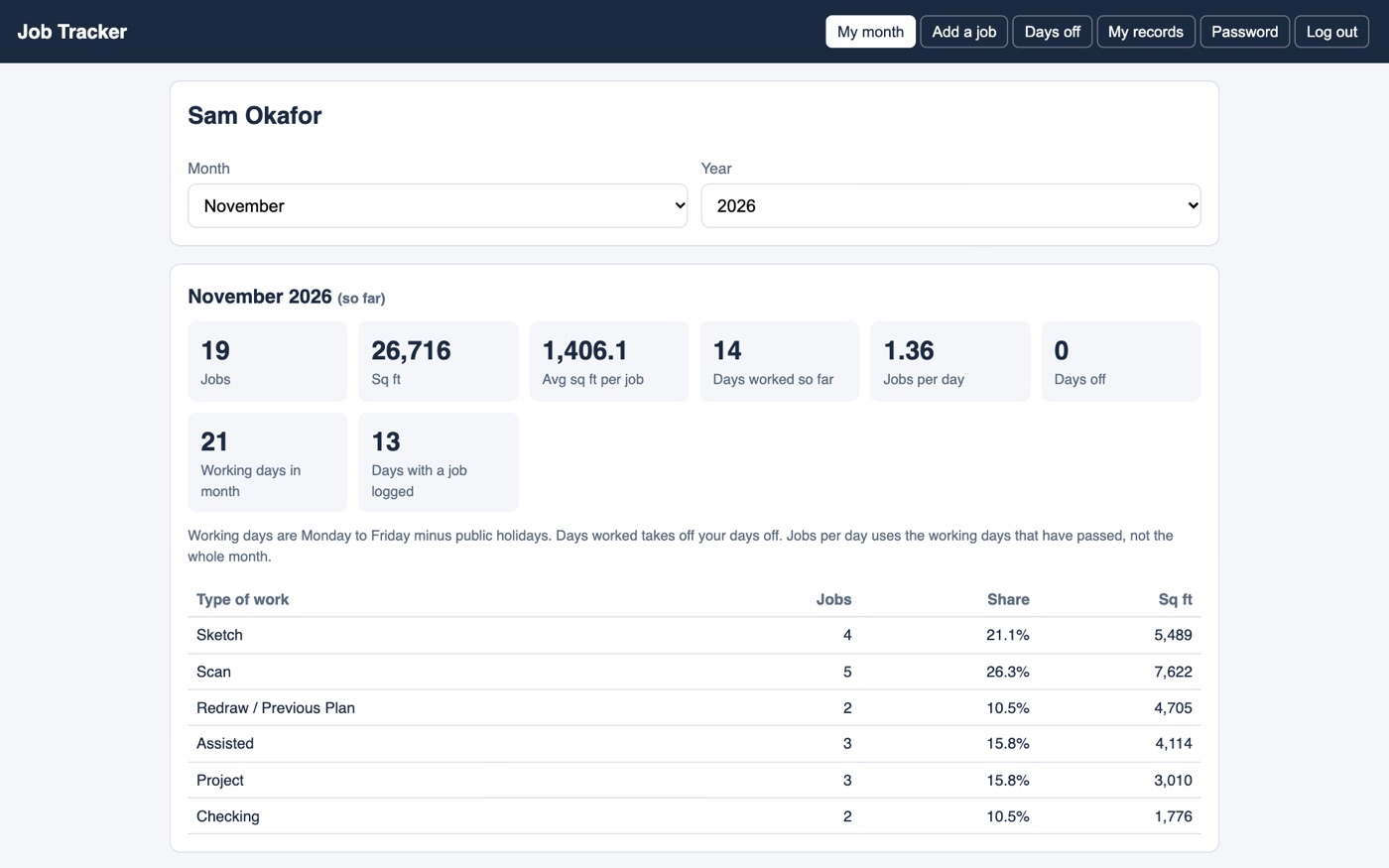
Jobs, square feet, average size, days worked and jobs per day, split by type of work. If someone logs something wrong, Doug can put it right.
The details that matter
- Private by design. Each person logs in and sees only their own jobs and figures.
- Jobs per day counts only the working days that have passed, so the middle of a month reads fairly.
- Enter the same address twice within 90 days and it asks whether you meant to, before it saves.
- After the 5th of the next month, a finished month locks so the team can no longer change it, and the figures stop moving. Doug can still fix mistakes.
- Doug owns it outright. It lives in his own Google account, and it runs without me.
In their words
Being the miser that I am, having no additional monthly costs for something as useful as this is freaking miraculous.Doug Rankine, Pix and Plans
Super quick turnaround, gave the brief, sneezed, then I had a working tracker.Doug Rankine, Pix and Plans
Can you open a web link? Then you can use it.Doug Rankine, Pix and Plans
A 2 minute admin task before you clock off for the day is easy for anyone.Doug Rankine, Pix and Plans
Having usable useful data is paramount, if you haven't got it already, get it.Doug Rankine, Pix and Plans
Still adding up your team's work by hand?
Tell me how you keep track today, and I'll tell you honestly whether it is worth building something. A free 30 minute call, no obligation.